The Komiko alternative made for comics
Komiko makes AI art, videos, character chats and comics, on the web and on phones. Emaki makes comics, manga and webtoons on your iPhone or iPad, one panel at a time. Here is how the two compare, and when Komiko is the better pick.
Checked on against Komiko's own site.
If you make comics on an iPhone or iPad, try Emaki. You save each character once, describe each panel, and write and place your own speech bubbles. If you want AI video, character chat, or a web or Android app, stay with Komiko.
Emaki vs Komiko
| Feature | Emaki | Komiko |
|---|---|---|
| What it is | Comic, manga and webtoon app | AI art, video, chat and comic studio |
| Where it runs | iPhone and iPad | Web, iPhone, iPad, Android |
| How a comic is made | One panel at a time | From one idea, all at once |
| Speech bubbles | You write and place them | Added by the AI |
| Saved characters | Saved once, called by name | OC Maker (a separate tool) |
| Page layouts | A strip, or 6 page layouts | Preset layouts |
| Art styles | Manga, Webtoon, US Comics, US Cartoon, dark, stick figures | American comic, manga, manhwa, anime, or your own |
| Video and animation | No | Yes |
| Character chat | No | Yes |
| Free to start | 1 free image | 500 Zaps, then 80 a day |
| Paid plans | Credit packs or a subscription | $9.99 to $49.99 a month (web) |
| Unused credits | Bought credits never expire | Monthly Zaps don't roll over |
Highlighted: the app that does better on that row.
An AI studio, or a comic app
Made only for comics
Emaki does one job. You start a project, pick its style, and build the comic scene by scene. Each scene is a strip or a set of pages, and each page uses one of six layouts. When you finish, you export pages, strips or single panels to your Photos library.

More than twenty tools in one account
Komiko's home page lists an image generator, a video generator, an OC Maker, character chat, text to speech, line art colorization, frame interpolation and two comic tools, among others. That suits you if comics are one part of what you make. If comics are all you make, you will use a small part of it.
One prompt, or one panel at a time
You check every panel
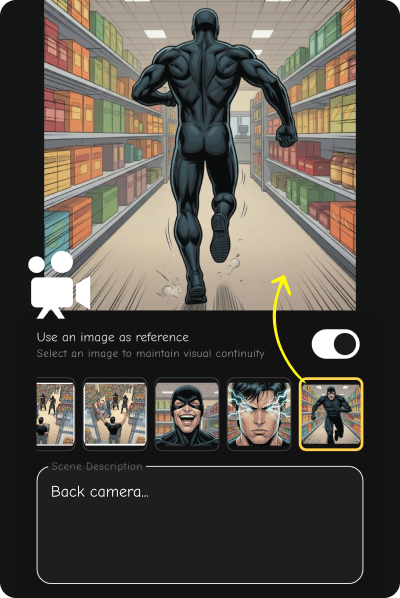
In Emaki you describe each panel: the place, the action, who is in it. Tap Generate Image, then Validate or Retry. To keep a room or a street the same, pick an earlier panel as a reference. Then add your speech bubbles: type the line, choose Speaking, Thinking or Narrative, drag it into place and point the tail at the speaker.
The AI drafts the whole comic
Komiko's AI Comic Generator starts from your idea. You pick a style and a layout, and the AI makes the panels, the art, the dialogue and the bubbles in one go. That is quick when you want a draft. For hands-on work, Komiko also has a Comics Canvas that starts from a blank page.
The same face in every panel
Save a character, then use their name
Make each character once with the character creator: name, hair, face, clothes, or start from a photo. Emaki saves their picture. From then on, write their name in a panel description and the app sends that picture with the request. The face and the outfit stay the same from the first page to the last.

An OC Maker next to the comic tools
Komiko has an OC Maker for designing original characters, and a tool to change a character's expression. Its AI Comic Generator page does not explain how a saved character keeps the same look from panel to panel. Test it with your own cast before you pay.
Zaps or credits
One credit per image
A new Emaki account gets one free credit, which makes one image. After that, you buy credit packs or subscribe. Each character picture and each panel costs one credit, and a set of three covers costs two. Credits you buy never expire.
A monthly Zap allowance
Komiko gives you more for free: 500 Zaps when you sign up, then 80 a day on the free plan. Paid plans on the web cost $9.99, $19.99 or $49.99 a month, for 5,000 to 50,000 Zaps. Unused monthly Zaps don't roll over. In the iPhone app, the same plans cost more: Starter is $12.99 a month.
What you get with Emaki
Characters that stay the same
Save a character once and call them by name. Emaki sends their picture with every panel that names them.
Your words, where you want them
Speaking, thinking and caption bubbles that you type, drag into place and point at the speaker.
Pages, strips and webtoons
Six page layouts or a strip. Export whole pages, one long strip, or each panel on its own for a webtoon.
Which one is right for you?
Choose Emaki if you...
- Want an app for comics, manga and webtoons, and nothing else
- Have a script and want to set up each panel yourself
- Want to write and place your own speech bubbles
- Need the same characters on every page
- Make your comics on an iPhone or iPad
- Want credits that never expire rather than a monthly allowance
Choose Komiko if you...
- Want AI video, animation or character chat as well as comics
- Want the AI to draft a whole comic from one idea
- Work in a web browser or on Android
- Want free daily Zaps to try things out
- Need extras like line art colorization or frame interpolation
Frequently Asked Questions
What is the best Komiko alternative for making comics? +
If you make comics on an iPhone or iPad, Emaki is built for that one job. You save each character once, describe each panel, pick from six page layouts, and write your own speech bubbles. If you need video, character chat or a web app, Komiko does more than Emaki.
Is Komiko shutting down? +
We found no shutdown notice on Komiko's own site when we checked on November 17, 2026, and its pricing page was still live. Its home page now promotes WorldOS, a site for turning stories into playable worlds. Check komiko.app for the latest news.
Is Emaki free? +
The download is free, and a new account gets one free credit for one image. After that, you buy credits or subscribe. Each image costs one credit, and credits you buy never expire.
Does Emaki work on Android or in a browser? +
No. Emaki runs on iPhone and iPad only. Komiko has a web app and an Android app.
Can Emaki make videos or animations? +
No. Emaki makes still images for comics, manga and webtoons. For AI video or animation, Komiko or a video tool is a better fit.
Can I bring my Komiko characters to Emaki? +
There is no import. Write down how each character looks (hair, face, clothes, and one detail that stands out), then create them again in Emaki. After that, their name brings back the same look in every panel.
Keep reading
Sources, checked on November 17, 2026
- Komiko home page (tool list, WorldOS banner)
- Komiko pricing (plans, free Zaps, roll-over)
- Komiko AI Comic Generator (how it works, styles, layouts)
- Komiko on the App Store (devices, in-app prices)
Prices and features change. If something here is out of date, write to us from the support page. Komiko is a trademark of its owner. This page is not made with or approved by Komiko.
Try the Komiko alternative for comics
Download Emaki, make your first character, and build your first page on your iPhone.